Business AI · Practical guide
Delegate an activity report to AI: files, instructions and a worked answer
Produce a report with traceable figures.
To delegate an activity report to AI, provide a dated snapshot, calculation rules and the required document format. Ask for the included and excluded rows alongside each total so you can verify the result before sharing it.
Fictional dossier with inputs, separate answers and reusable templates.
Download this guide’s exercise kitThis fictional dossier contains six orders. The expected result is four included orders, €10,000 ordered excluding tax and €6,800 delivered excluding tax. One delivery remains overdue. The files establish neither the causes of delays nor payment deadlines.
Below are the necessary files, a complete instruction, a worked report and a method for adapting the exercise to your own export.
Download only the five input files. Keep the answer key separate.
Try it: open the interactive workshop to explore the rule and its explanation. Calculations stay on your device.
Download the files, instructions and answer key.
Set the reporting date and name the right measure
The fictional business is Atelier Méridien. Its snapshot is dated 27 September 2026. The requested document is a provisional September report, because the month is not over.
The main measure is the value of confirmed, non-cancelled orders in the snapshot. We will not call it revenue: the supplied documents do not establish that accounting measure.
Amounts are in euros excluding tax. In the basic exercise, delivery dates represent complete deliveries. The basic dataset has no partial deliveries; the separate advanced exercise below introduces them with different rules.
| Order | Status | Value excluding tax | Due for delivery | Fully delivered | Payment recorded |
|---|---|---|---|---|---|
| C101 | Confirmed | €2,400 | 10 September | 9 September | Yes, 11 September |
| C102 | Confirmed | €1,800 | 15 September | 18 September | No |
| C103 | Confirmed | €3,200 | 24 September | Not delivered | No |
| C104 | Cancelled | €900 | 20 September | None | No |
| C105 | Draft | €1,500 | 28 September | None | No |
| C106 | Confirmed | €2,600 | 25 September | 25 September | No |
Supply a complete working dossier
Before uploading an export, define its fields. A small data dictionary prevents the AI from guessing how your software represents information.
| Field | Definition in Méridien | Handling an absent value |
|---|---|---|
| Identifier | One complete order, appearing once | Stop and establish the row's identity |
| Status | Confirmed, cancelled or draft | Request classification; do not assume confirmed |
| Amount | Complete order total, euros excluding tax | Do not replace an unknown amount with zero |
| Delivery due | Agreed date, year-month-day | Delay cannot be calculated without it |
| Fully delivered | Actual date; empty means not delivered here | Apply this specific R01 convention |
| Payment recorded | Date a complete payment was entered in the snapshot | No payment recorded; bank position unverified |
Zero is a value: a zero-euro order and an unknown amount convey different information. A red cell is not a usable status without a convention. Add an explicit column if a colour means cancelled or needs review.
Keep the original export separate from transformations and the report. Log any corrected date or status and the reason for changing it. This lets you explain differences between the received file and the final report.
The kit includes the order snapshot, calculation rules and three report-approval documents. Together, they support the calculations and identify the approver applicable on the reporting date.
Separate inputs from answers. Give the inputs folder to the AI; keep answers with the reviewer. Supplying the answer key would stop the exercise from testing the tool's ability to process the documents.
First ask the tool to name the files it can access. This can reveal a wrong project, an old attachment or a missing export. Voice can help dictate the request, but preserve a written instruction so you can check the period, definitions and limits.
The complete instruction to supply with the files
The kit includes a copyable version in instructions.md. Give the tool the inputs only.
Prepare Atelier Méridien's provisional September 2026 activity report,
as of and including 27 September 2026, using only the supplied files.
Start by naming the documents you could read.

Apply R01. List included orders and justified exclusions.
Calculate counts and values, then delivered shares by count and by value.
Distinguish resolved delivery delays from delays still open.
Report recorded payments without inferring missing payment deadlines.
Find the approver applicable on 27 September in S01/S02/S03.

Deliver a one-page report, alerts and decisions needed,
followed by an appendix with identifiers, calculations and sources.
Flag missing or inconsistent information that prevents a calculation.
Invent no target, trend or cause. Do not distribute the document.
Call the amounts order values; do not present them as revenue.
If the tool cannot calculate with a spreadsheet or program, verify the arithmetic independently. Fluent writing is not evidence that the totals are correct.
Organise the work so errors can be traced
A recurring report follows a sufficiently stable sequence to separate its operations. Check each intermediate result before writing the summary.
| Stage | Expected output | If the check fails |
|---|---|---|
| Read documents | File list, period and row definitions | Obtain the missing file or definition |
| Validate data | Identifiers, statuses, units and anomalies | Set questionable rows aside without deleting them |
| Apply rules | Justified inclusion and exclusion list | Resolve ambiguous rules |
| Calculate | Figures with inspectable formulas or code | Correct calculations before drafting |
| Explain | Report tied to validated figures | Remove unsupported causes and trends |
| Approve | Document accepted by its owner | Correct the deliverable and recheck affected figures |
A spreadsheet or program can perform additions and consistency checks. AI can help prepare that processing and explain the outputs. If it generates formulas or code, check those against an example with a known answer too.
For recurring work, the owner should be able to open the calculation sheet and trace the source rows. “The assistant says it checked the figures” is not a verifiable appendix.
The report supported by these documents

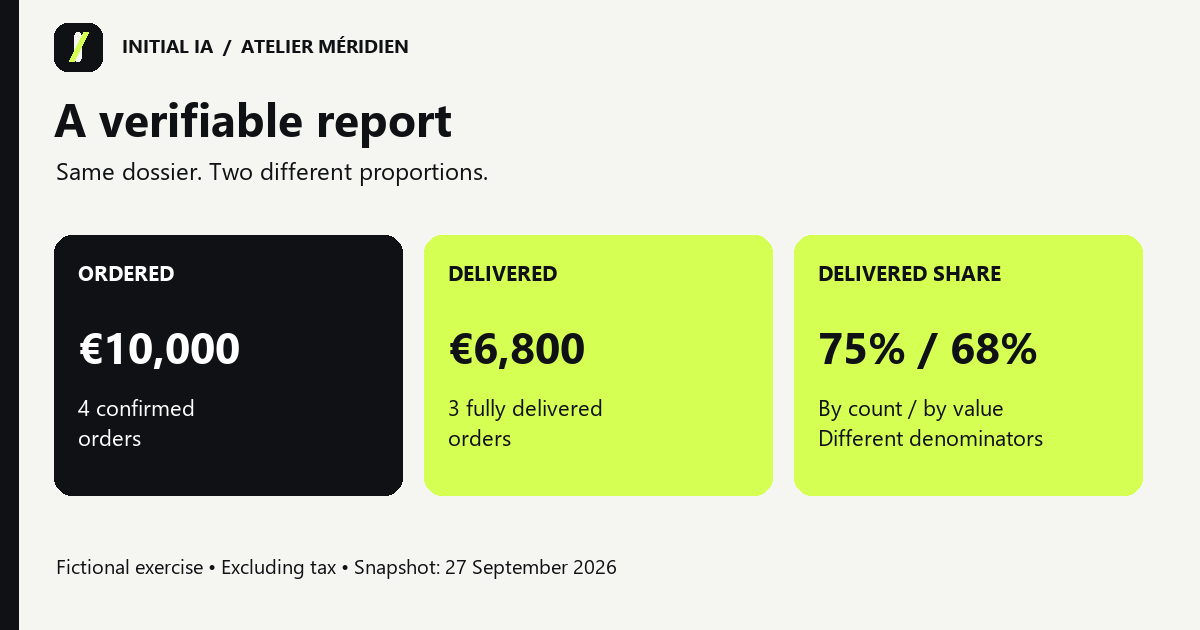
Provisional September report, as of 27 September 2026. Four confirmed orders are included, totalling €10,000 excluding tax: C101, C102, C103 and C106. C104 is excluded because it was cancelled; C105 is excluded because it is still a draft.
Three orders have been fully delivered, totalling €6,800 excluding tax. The delivered share is therefore 75% by order count and 68% by order value. The two percentages measure different things.
Two orders cross the two-day alert threshold. C102 was delivered three days late. C103 remains undelivered, three days late as of 27 September. The former informs a service-quality review; the latter still needs operational action.
The snapshot records a €2,400 payment for C101. This is the amount entered in the file, without bank reconciliation. Among delivered orders, €4,400 is marked unpaid. We cannot call those payments overdue because the dossier contains no payment deadlines.
Élise approves this report as of 27 September. S02 transfers that responsibility to Karim from 1 October. S03's proposal for automatic sending remains unapproved.
The sales target, an August comparison and the causes of delays are absent. Leave those questions open. The report cannot establish that September improved, that the team is understaffed or that a customer refuses to pay.
This is the answer key for a fictional exercise, not an output attributed to a tested product.
Check the arithmetic in a few lines

| Check | Expected calculation |
|---|---|
| Included orders | C101 + C102 + C103 + C106 = 4 |
| Included value | 2,400 + 1,800 + 3,200 + 2,600 = €10,000 |
| Delivered value | 2,400 + 1,800 + 2,600 = €6,800 |
| Delivered share by count | 3 ÷ 4 = 75% |
| Delivered share by value | 6,800 ÷ 10,000 = 68% |
| C102 delay | 18 September − 15 September = 3 days |
| C103 delay | 27 September − 24 September = 3 days |
| Delivered, marked unpaid | C102 + C106 = €4,400 |
A €12,400 total would incorrectly include the cancelled order and the draft. Calling 68% the delivered share by count would confuse units. Alerting on both late orders without identifying C102 as delivered would imply that both deliveries remain outstanding.
If the tool produces €12,400, do not immediately supply the correct answer. Ask which rows it included, their statuses and the rule it applied. You can then tell whether it included C104/C105 or made a different mistake.
Correction instruction: “Recalculate the total using R01. Give one line per order: included or excluded, value and justification. Recalculate the total and all dependent percentages.” After correction, check the proportions as well: a corrected total may leave an old percentage in the prose.
Turn the report into next actions
The immediate action concerns C103: an operational owner should confirm its actual status and the next promised date. The dossier does not identify that person. Request an assignment rather than choosing someone arbitrarily.
For C102, the team can document the delay's cause to investigate recurrence. For payments, obtain the deadlines before preparing a reminder. Élise reviews the document before distribution.
Next month, preserve the rules and replace the snapshot. Explicitly change the reporting date, then check whether the approver or indicator definitions have changed. A report dated 2 October must account for the transfer to Karim even if September's documents remain in the folder.
Adapt the dossier to your export without distorting it
Six orders are easy to inspect. In a real export, first define a row: a complete order, an ordered item or a delivery event. Multiple rows with the same order number may be legitimate. Automatic deduplication can remove real work; summing a repeated order total can count it twice.
| Export situation | Definition needed before calculating |
|---|---|
| Several rows per order | Are these product lines or repeated complete-order totals? |
| Partial delivery | Is the delivered value available? A date alone is insufficient. |
| Multiple currencies | Keep totals separate until a conversion rule is defined. |
| Empty dates | Distinguish not delivered from information unknown in this source. |
| Order changed after the reporting date | Use its historical state or disclose that history is missing. |
R01 explicitly defines one row per complete order and an empty delivery date as not delivered. These are exercise conventions. Verify your software's conventions before reusing them.
The kit includes templates/report-template.md. Start with a copy of your export, identify the period and rules, and have the first report reviewed by the person who normally prepares it.
Partial deliveries: a second worked exercise

The basic dossier contains one row per order and complete deliveries. This separate fictional exercise uses one row per ordered product. Delivered quantities are cumulative at the reporting date. All amounts exclude tax; there are no discounts, returns or extra charges.
| Order / line | Ordered quantity | Delivered quantity | Unit price | Ordered value | Delivered value |
|---|---|---|---|---|---|
| C201 / L1 | 10 | 4 | €80 | €800 | €320 |
| C201 / L2 | 4 | 4 | €250 | €1,000 | €1,000 |
| C202 / L1 | 5 | 0 | €40 | €200 | €0 |
| Total | €2,000 | €1,320 |
The remaining value is €680: six units at €80 on C201 plus five at €40 on C202. The delivered share by value is 66%. Yet neither order is fully delivered: C201 is partial and C202 has not started. The share of fully delivered orders is therefore 0%.
The two C201 rows are not duplicates; they represent different products. If the export also repeats the €1,800 complete-order total on both rows, adding that column with C202 would produce €3,800. Choose line-level calculations or count each complete-order total once.
Ordered value = sum(ordered quantity × unit price)
Delivered value = sum(delivered quantity × unit price)
Remaining value = ordered value − delivered value
Here, 2,000 = 1,320 + 680. If the export describes successive delivery events instead of cumulative quantities, first group them by their identifiers. Adding a daily cumulative quantity repeatedly counts units already delivered.
The kit's advanced folder supplies the rows, answer and an optional Python verifier. You can also check the multiplications by hand. An unknown delivered quantity must remain unknown; the verifier refuses to convert it silently to zero.
Check the scope of an Excel data profile
If you inspect the export with Power Query, its data-profiling tools use the first 1,000 rows by default. The setting at the bottom of the editor switches profiling to the entire dataset. For a longer file, check that scope before concluding that a column contains no errors or empty values.
This setting concerns the displayed statistical profile, not a general 1,000-row transformation limit. Record the total row count and compare it with the source file. A reassuring preview does not replace a check of what was actually analysed.
Check data quality before producing the report
A complete export can contain wrong values. A correctly formatted amount can belong to the wrong order. For your first report, separate these checks and preserve their results in the appendix.
| Check | Question about your export | Consequence of failure |
|---|---|---|
| Completeness | Are required identifiers, statuses and amounts present? | Keep unknowns visible; pause affected indicators |
| Uniqueness | Does the key identify an order or a product line? | Examine repetitions before deleting or summing |
| Validity | Do dates, units and statuses follow the conventions? | Correct the representation or request its definition |
| Consistency | Does a cancelled order still enter a confirmed-order total? | Review the filter and dependent calculations |
| Timeliness | Does the file represent the state on the reporting date? | Obtain the correct snapshot or disclose missing history |
| Accuracy | Do the values match the underlying business documents? | Reconcile sensitive rows against their source |
The date 2026-09-31 is invalid. A date of 25 September can be valid in format yet wrong for a delivery completed on the 24th. The first check is readily programmable; the second needs business evidence.
An anomaly must not disappear into a total
In a separate fictional variation, suppose C103's amount is missing. You can still count four confirmed orders if their identifiers and statuses are reliable. You can no longer claim a €10,000 total. The other three orders' €6,800 form a known subtotal, not a complete total or proof of a 100% delivered share.
Record C103, the missing field, affected indicators and the person responsible for completing the source. The delivered share by count remains calculable under these assumptions; the share by value does not. Make that distinction visible in the report.
After correction, recalculate the total, proportions, charts and summary. All may depend on the same field. The kit includes a checking sheet linking each anomaly to its consequences.
Correct a source without leaving three versions of the same figure
A correction becomes dangerous when it changes the total but leaves the old percentage in the summary. Consider a separate fictional variant of the Méridien answer key: after checking a supporting document, the owner confirms that C103 should have shown €3,500, rather than €3,200, at the reporting date. This corrects a recording error; it is not a new order received after 27 September.
| Measure | Original version | Corrected version | Reason |
|---|---|---|---|
| Confirmed order value | €10,000 | €10,300 | C103 increases by €300 |
| Delivered value | €6,800 | €6,800 | C103 remains undelivered |
| Delivered share by value | 68% | 66.0% | 6,800 ÷ 10,300, rounded to one decimal place |
| Delivered share by count | 75% | 75% | Still three delivered orders out of four |
| Delivered and marked unpaid | €4,400 | €4,400 | Delivered orders have not changed |
Preserve the original snapshot. In a new version, record the supporting document, correction owner and date. Recalculate affected measures, then reconcile the table, chart and summary paragraph. A correction does not authorise silently rewriting the history.
If nobody can justify €3,500, the assistant should flag the conflict. It must not choose whichever value makes the report appear more consistent. If the change represents an event after the reporting date, it belongs in the next snapshot unless an explicit restatement rule has been agreed.
Separating the required outcome, authority and review connects with Ethan Mollick's delegation approach in “Management as AI superpower”. The C103 variant and arithmetic are our original illustration, not a client result or a software trial.
Verify the delivered file, not just the assistant's message
If the request includes a spreadsheet, open the actual output: source rows should be traceable, numbers usable, and formulas or calculations inspectable. “The file is ready” establishes neither existence nor correctness.
Reconcile the appendix total with the report. Check the period in both filename and document. Ensure a corrected version has not retained the old summary as an attachment. The applicable owner approves distribution only after these checks.
Decide when to integrate the task with business tools
Begin with a controlled export and human review. Record input-preparation time, checking time and corrected errors. These measurements help determine whether a recurring integration is worthwhile.
If most effort still goes into gathering documents, connecting the sources may become the priority. If corrections arise from changing definitions, stabilise those definitions before building automation.
To examine this task with Initial IA: bring an example snapshot, the report currently produced, its frequency and the person who approves it. That provides a concrete deliverable for an integration, with checks your team understands.
Try it yourself.
Find fictional documents, blank templates and answer keys in the practical kit.
Download this guide’s exercise kit