Organisation · Practical guide
Which task should an SME automate first?
Choose a trial and count review time too.

Start with a task that is frequent, stable and easy to check, with a person responsible for the result. Compare current time with the full time after automation: preparation, checking, corrections and monitoring. If a simple rule is enough, first check existing tool features.
The worksheet helps describe input, expected output, exceptions and stopping criteria.
Download the decision worksheetThree candidates, three different decisions
| Task | What to check | Suggested first trial |
|---|---|---|
| Remind someone of a deadline recorded in the CRM | Reliable date, recipient, reminder rule | Conventional CRM automation |
| Extract rows from PDF purchase orders | Received formats, missing fields, total checks | Extraction on a few known formats, human approval |
| Reply independently to a complaint with a discount | Responsibility, commercial rules, incomplete context | Prepare a reviewed draft; retain human decision-making |
The first candidate may not need AI. The second lends itself to a measurable document trial. The third combines reading, judgement and commercial commitment: separate those steps before automating.
Do not choose only the most annoying task. A rare exception involving three people may be harder to handle than data entry repeated a hundred times.
Five questions before building
- What input triggers the work? A received file, date or specific message.
- How do you recognise a correct output? Verifiable fields, total or decision.
- How often does the task recur? Record actual volume rather than an impression.
- What happens if the result is wrong? Internal rework and a client commitment have different consequences.
- Who approves and handles exceptions? Name a person before the test.
If you cannot describe the correct output, clarify the process first. AI does not resolve disagreement over the expected result.
Example: do 20 hours of work really become 11?
Here is a fictional scenario with all assumptions visible. It covers 80 monthly files, currently processed in 15 minutes each.
| Item | Assumption and calculation | Monthly time |
|---|---|---|
| Current processing | 80 × 15 min | 20 h |
| Preparation and checking after automation | 80 × 6 min | 8 h |
| Additional rework | 10 × 12 min | 2 h |
| System monitoring | 60 min | 1 h |
| Total after automation | 8 + 2 + 1 | 11 h |
| Potential time freed up | 20 − 11 | 9 h |
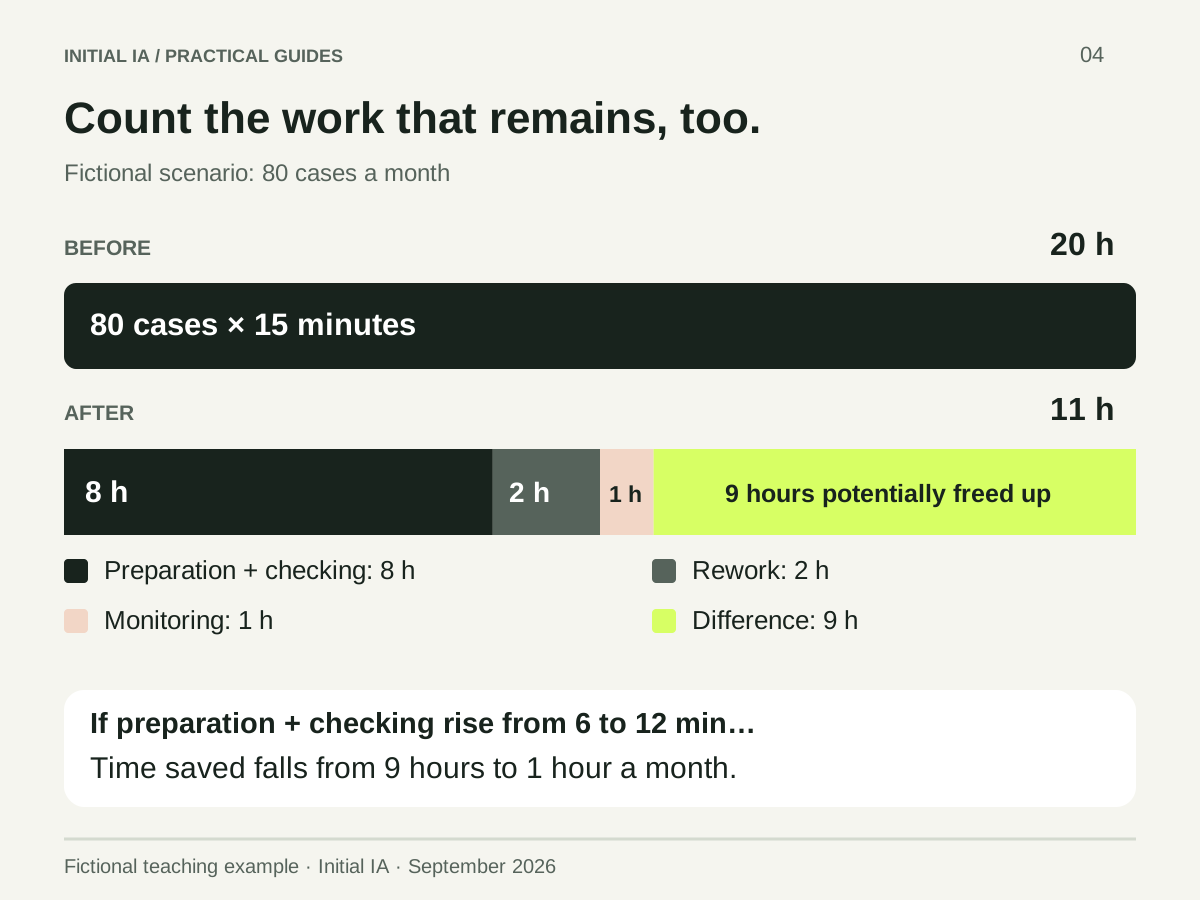
The factor that can change everything: review time. If preparation and checking take 12 minutes per file instead of 6, the total rises to 19 hours. Only one hour per month is potentially freed.
Installation, training, tool and usage costs still need to be included. Available time does not automatically become cash savings. The ROI calculator helps extend the calculation.
How to run a trial that supports a decision
Gather ordinary cases and known exceptions. Hold some cases out during preparation: they will check whether the method works beyond examples already adjusted.
For each file, measure total time. Record incorrect values, corrections and the reviewer's decision. The trial log provides the fields to record.
Set criteria before seeing results. For order extraction, for example: no invented references, checked amounts and approval before import. The acceptable time threshold must come from your current situation.
| Trial result | Useful decision |
|---|---|
| Reliable output and shorter checking | Expand gradually to the same formats |
| Good result on only one format | Limit scope to that format |
| Review almost as long as manual processing | Review the method or choose another task |
| Hard-to-detect errors | Strengthen checking before any expansion |
Should software be connected from the start?
You can first prepare inputs manually and have outputs reviewed. Count that time in the assessment. Connection becomes useful once the data to read, actions to perform and necessary permissions are identified.
A written instruction does not technically restrict a tool's access. For a connected installation, the ANSSI recommendations provide a security framework.
The next action is simple: bring together the person performing the task and the person using its result, complete three worksheet rows and choose a limited trial. The AI integration service helps scope and install this first use case in your tools.
Try it yourself.
Find fictional documents, blank templates and answer keys in the practical kit.
Open the practical kit