Business memory · Practical guide
Business AI memory: keeping decisions current when the rules change
Build a verifiable current-state sheet.
To keep business AI memory current, record what was approved, when it takes effect and which rule it replaces. Preserve the original source, update the current state and repeat the questions whose answers have changed.
Fictional dossier with inputs, separate answers and reusable templates.
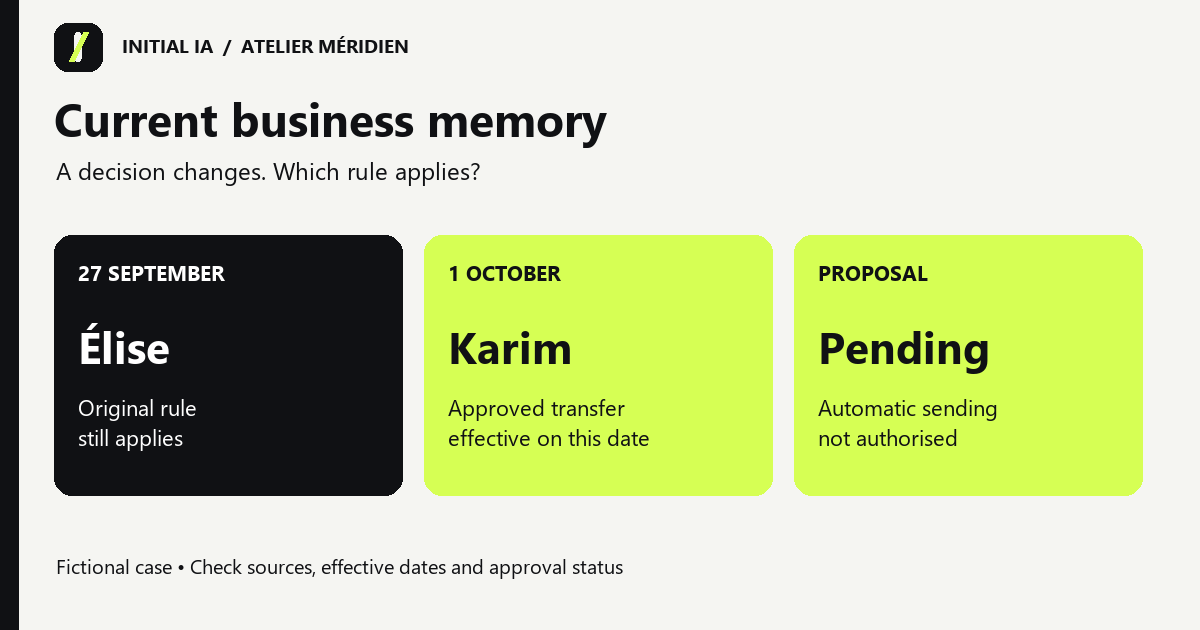
Download this guide’s exercise kitConsider a fictional example. Élise approves September reports. An approved decision says Karim takes over on 1 October. A more recent message proposes automatic sending but has not been approved. The newest file alone cannot answer “Who approves the report today?”
By the end of this exercise, you will have a current-state sheet, a change log and five checking questions. The kit includes reusable templates.
Download only the five input files. Keep the answer key separate.
Try it: open the interactive workshop to explore the rule and its explanation. Calculations stay on your device.
Download the source files, templates and answer key.
Start with a process someone can verify
Choose a process whose owner can check the answers: approving an activity report, preparing a delivery or following a project. Include an initial decision, a confirmed change and an open proposal.
Our fictional business, Atelier Méridien, is preparing its activity report. Three documents are enough to practise handling changes.
| Source | Date and status | What it says |
|---|---|---|
| S01, original procedure | 5 September, approved | Élise approves the report. A delivery delay of at least two days triggers an alert. |
| S02, responsibility transfer | 23 September, approved by Élise | Karim becomes the approver on 1 October. The alert threshold remains unchanged. |
| S03, automation proposal | 26 September, unapproved | The team proposes sending reports automatically without approval. |
These documents are invented for the exercise; they do not describe an Initial client. On 27 September, the approver is still Élise. On 2 October, it is Karim. Automatic sending is not authorised on either date. The delay threshold stays at two days.
Copy S01, S02 and S03 from inputs into an authorised workspace. Keep answers separate. If attachments are unavailable, paste the documents while preserving identifiers and dates. Ask the tool to identify the files it can access before asking your questions.
Preserve the sources, then write the current state
Three things connect a decision to an answer: the stored document, the information retrieved for the question and the answer generated from it. Checking them separately helps explain an error.
A document may be in the folder while the relevant passage is never retrieved. The tool may also retrieve the right document and misinterpret its date. Adding more files will not necessarily solve either problem.
Keep all three documents. Create a short entry point alongside them: current-state.md. It records the rule applicable on a specified date and points back to the originals. For 2 October, the expected content is:
Process: activity report approval
State applicable on: 2026-10-02
Approver: Karim
Source: S02, decision approved on 2026-09-23
Effective from: 2026-10-01
Previous rule: Élise, S01, applicable through 2026-09-30
Alert threshold: delivery delay of at least 2 days, S01, confirmed by S02
Automatic sending: proposal S03, unapproved
October order target: absent from the sources
The current-state sheet helps readers find the answer; the sources let them check it. If the sheet contradicts S02, correct the sheet and record the change.
A simple structure is sufficient: a sources folder, a current-state file and a change log. Before adding an interface or visual map, make sure these elements answer the team's actual questions.
Understand what the AI actually consults
Some tools use documents supplied directly in the working context. Others retrieve extracts from a document collection. The latter approach is often called retrieval-augmented generation, or RAG.
Retrieval lets a system work with a collection larger than the passages supplied for a single answer. It also introduces a question: did it retrieve everything needed? Importing a file does not prove that its entire content was used.
In Méridien, an extract saying only “Karim replaces Élise as approver” loses the essential nearby condition: “from 1 October”. The name is correct, yet the answer can still be wrong for September.
Before changing models, try this request:
To answer “Who approves on 27 September?”, show the source passages
actually used, including their identifiers and dates.
Keep the sentence specifying the effective date and the sentence
describing the previous rule. Say if you cannot retrieve them.
Then answer for the requested date.
Check these extracts against the originals. Generated quotations also need checking. If the interface exposes retrieved passages or consulted files, use those records; an assistant's statement that it “checked everything” is insufficient evidence.
In your own procedures, keep the subject, decision, effective date and exceptions close together. A date table without a project heading, or a rule whose exception sits in an unattached appendix, is harder to interpret correctly.
Separate the document date from the effective date
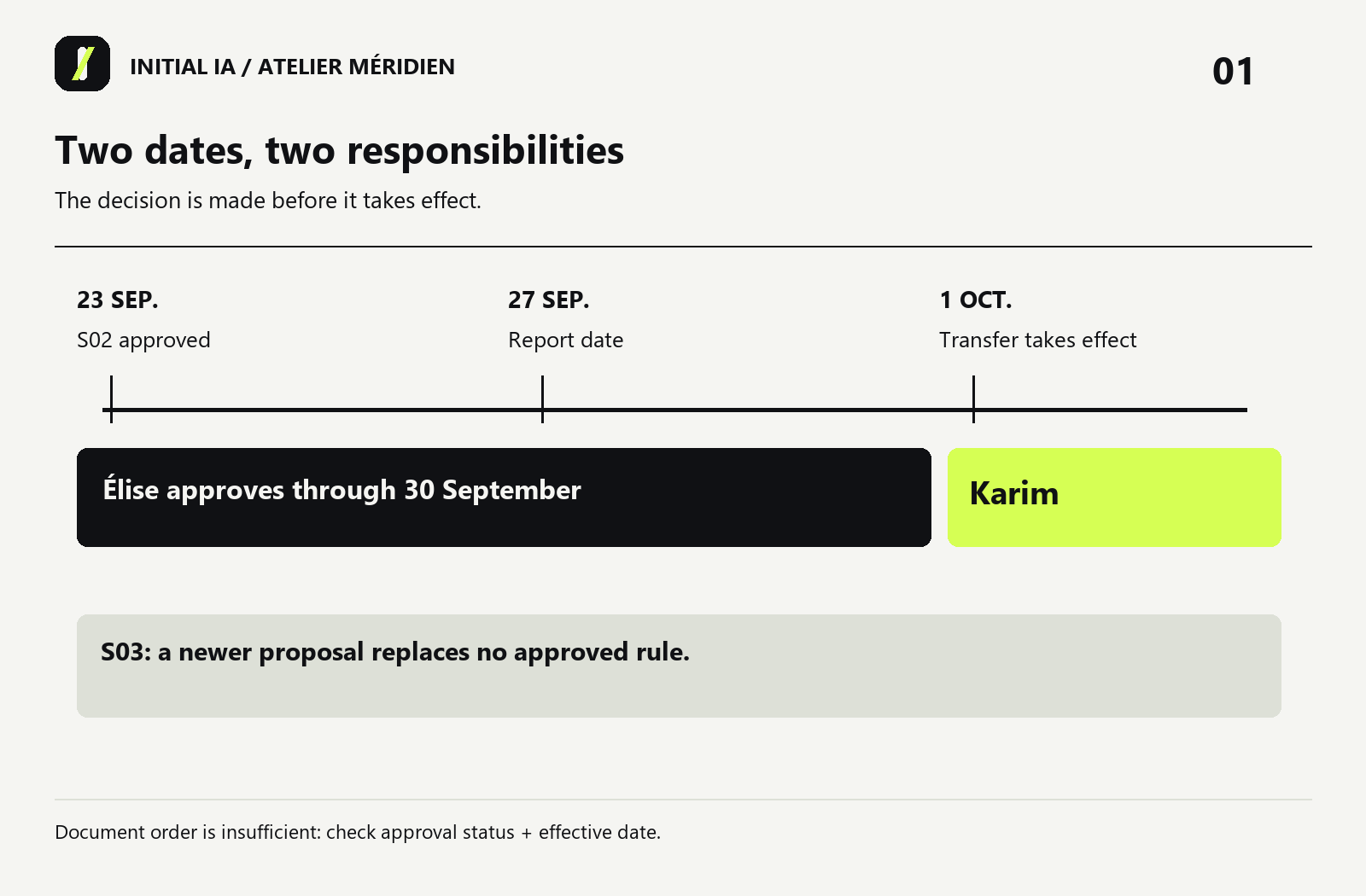
S02 is dated 23 September, but the transfer happens on 1 October. The first date traces the decision; the second determines when it applies. Record both when a decision changes a rule.
| Field | Example | Purpose |
|---|---|---|
| Identifier | D02 | Find the same decision independently of its filename |
| Subject | Report approver | Specify what changes |
| Status | Approved | Distinguish a decision from a suggestion |
| Authority | Élise | Identify who approved it |
| Decision date | 23 September | Preserve the chronology |
| Effective from | 1 October | Answer for the correct period |
| Replaces | S01, approver field | Avoid replacing the entire procedure |
| Source | S02 | Check the original wording |
S02 replaces a person, not the alert threshold. Replacing S01 wholesale would lose a rule that still applies.
Process new information without rewriting everything
When a document arrives, first identify what it changes. This instruction provides a starting point:
Read the new document and the process sources.
List new facts with their source, status and effective date.
For each fact, identify the previous rule it affects.
Do not turn a proposal into a decision.
Replace only fields that are explicitly changed.
If equally authoritative decisions conflict without clear supersession,
flag the conflict and state the question that needs an authorised decision.
Prepare the current-state update and the change log.
The owner then reviews the proposed changes. Reviewing a few lines makes a shifted date or changed status easier to spot. Written instructions do not replace technical permissions: the tool also needs access and action controls matching the authorised scope.
In this example, adding S03 should create only an open proposal. It must change neither the approver nor the sending rule.
Retest memory after each significant change
Prepare checking questions before the update. Their answer key becomes a small, reusable test set.
| Question | Reference answer | Source |
|---|---|---|
| Who approves on 27 September? | Élise | S01 and S02's effective date |
| Who approves on 2 October? | Karim | S02 |
| Can the report be sent automatically? | No: the proposal is unapproved | S03 and the approval requirement in S01/S02 |
| Does a three-day delay trigger an alert? | Yes | S01, threshold retained by S02 |
| What is October's order target? | Information absent | No source sets one |
Ask these questions in a fresh conversation with the correct files available. Check the answers and cited documents. This answer key was written from the fictional dossier; it is not a reported result from a software test.
If the system answers Élise for October, first check S02's availability and effective date. If it authorises sending, inspect how it handled S03's status. Reject an invented target even if the other answers are correct.
Correct a wrong answer without hiding its cause
Here is an intentionally wrong answer written for the exercise:
“As of 27 September, Karim approves the report. The latest message now authorises automatic sending.”
There are two separate errors. Karim takes over only on 1 October. S03 is a proposal, not permission. Saying only “that is wrong” may fix the current answer while leaving the underlying sheet unchanged.
Revisit these claims: “Karim approves on 27 September” and
“automatic sending is authorised”.
For each, identify the document, its status and effective date.
Correct the answer and say whether the current-state sheet needs updating.
Preserve the answers applicable on 27 September and on 2 October.
The expected correction is: “Élise approves on 27 September; Karim from 1 October. Automatic sending remains unapproved.” Check the current-state sheet, then repeat the five questions in another conversation. Correcting one conversation does not prove that stored memory has changed.
| Observation | Check | Useful correction |
|---|---|---|
| The AI cites only S01 | Is S02 accessible in this conversation? | Add the missing document and repeat the test |
| It cites S02 but applies Karim in September | Was the effective date preserved? | Separate decision and effective dates in the sheet |
| It accepts S03 | Is the unapproved status visible? | Restore the status and remove the inferred permission |
| Two approved documents genuinely conflict | Has an authority resolved their replacement? | Obtain a decision and keep the unresolved question visible |
Plan the next verification
A decision can remain valid for years. Team availability or order lists can change much faster. Assign an owner and a review trigger to each category.
For Méridien, the 1 October responsibility transfer triggers a current-state review and the five questions. A threshold change would trigger the same checks. New orders belong in a separate dated snapshot.
If nobody can confirm that information is still valid, show its last verification date and the uncertainty. A previously correct answer can become misleading when presented without a date.
Verify that a source change reaches the answers
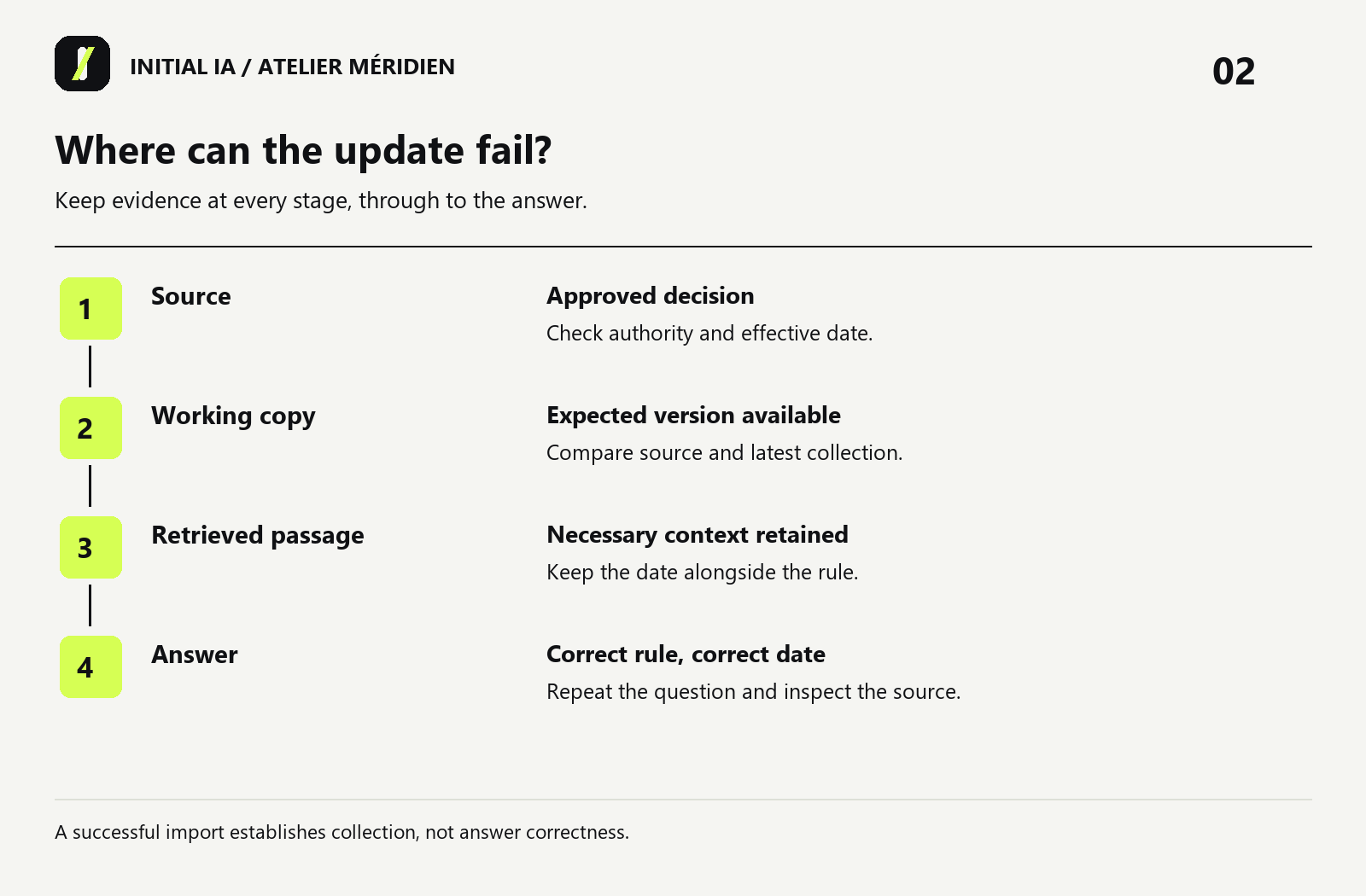
You edit a shared document at 10 am. An assistant may still use a copy imported yesterday. Distinguish the source timestamp, the last collection time and the answer-check time.
| Item to inspect | Fictional example | What it establishes |
|---|---|---|
| Business document | S02 was corrected at 10 am | The source changed |
| Copy or extract in use | Yesterday's version is still in the folder | The current source is unavailable here |
| Retrieved passage | The tool cites the former approver | The answer still relies on outdated information |
| Answer after refresh | Correct person, date and source | This checked case works with this version |
Keep a “change applied, verification pending” entry until the final check is complete. With manual attachments, this may mean replacing a file and starting a fresh conversation. With a connected system, check collection and search-index updates with its operator.
Do not automatically remove old rules. They may explain a decision made last month. Mark them as historical and specify their period of application. “Who approves today?” and “Who should have approved on 27 September?” require different states.
Share memory with the right people
Shared memory must respect document permissions. Filtering needs to happen during data access or retrieval, before unauthorised passages reach the model. A prompt saying “do not reveal confidential files” does not replace that control.
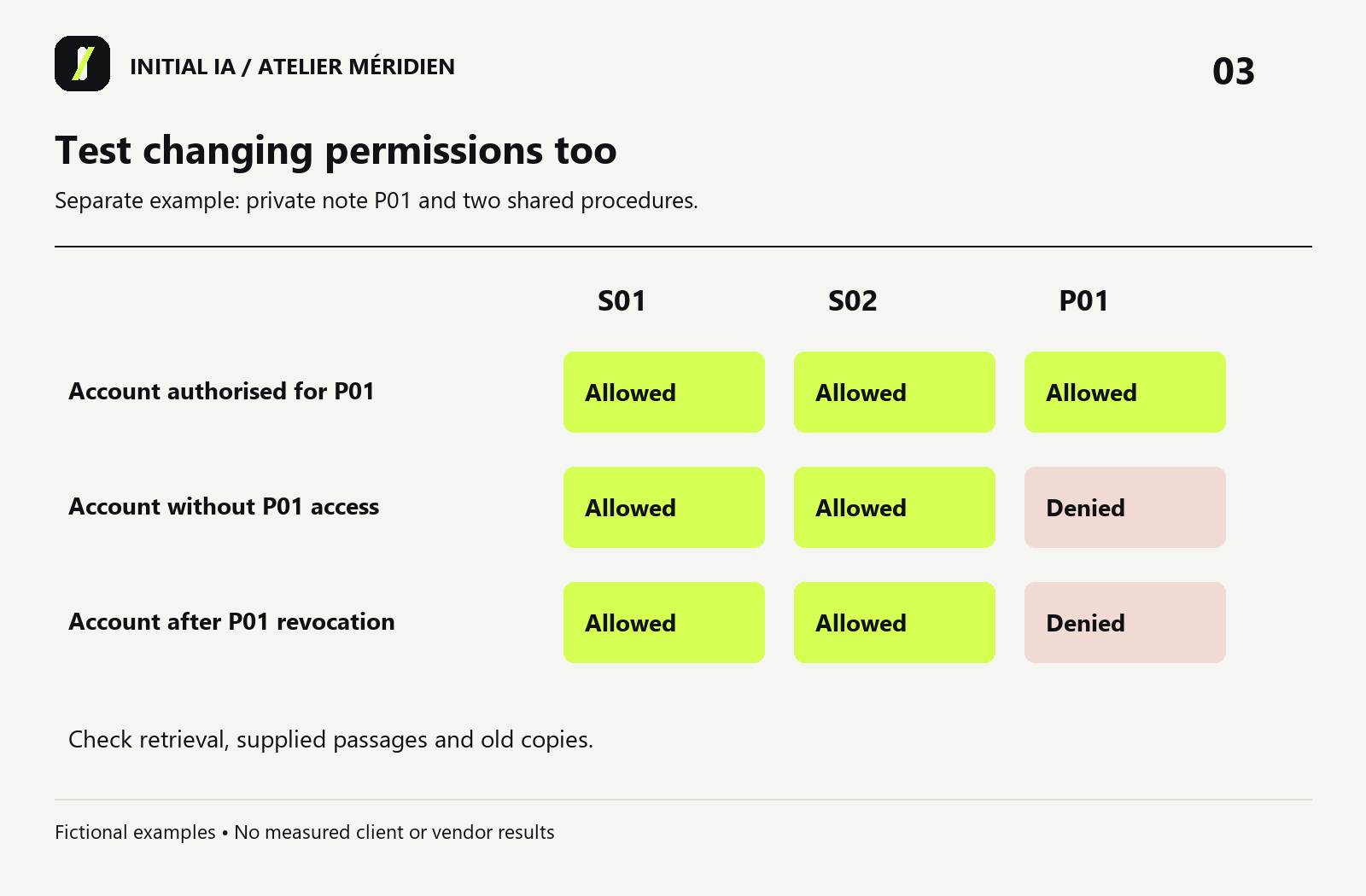
For acceptance testing, use two authorised test accounts: one should access a document and the other should not. Ask a question requiring that document and inspect what each receives. Also test a recently revoked permission. A factually correct answer remains unacceptable if it discloses information to the wrong person.
Choose a proportionate setup
| Situation | Suggested starting point | Reason to consider the next step |
|---|---|---|
| One occasional dossier, a few files, one user | Authorised attachments, current-state sheet and five questions | The dossier must be retrieved or updated regularly |
| Team procedures maintained by an owner | Shared document space, versions and a checking procedure | Manual collection becomes repetitive or permissions more complex |
| Several frequently changing sources and different access rights | Consider collection and search integrated with your tools | You can explain freshness, access and failure handling before rollout |
The choice depends on change frequency and responsibilities, not just document count. Start with a bounded process. Define an acceptable answer, when the system must say “information missing” and who corrects a source when it is wrong.
When should memory pause an answer?
A well-written answer may still be unusable if its source is stale or two approved decisions conflict. Define what allows an answer and what requires verification. The following is a proposed pilot rule, not a universal standard.
| Observed situation | Permitted response | Work required |
|---|---|---|
| Approved, accessible source applicable on the requested date | Answer with source and date | Preserve the checking record |
| Source changed but the working copy is older | Say the current rule still needs verification | Refresh collection and repeat the question |
| Conflicting approved decisions without explicit supersession | Explain the conflict without arbitrarily choosing | Obtain a decision from the process authority |
| Recent proposal without approval | Describe it as a proposal | Preserve the current rule |
| Necessary document outside the requester's permissions | Do not disclose its contents | Use the authorised access-request process |
Consider a separate fictional case outside S01–S03: an owner revokes a test account's access to a note. Its text does not change. A check based only on content modification dates could therefore miss the access change. Your acceptance test needs to cover permissions too.
Verify three things: the account no longer retrieves the document in a new search; no passage from it reaches the new answer's context; and no old copy or conversation remains accessible through a path the revocation was meant to close. Exact mechanisms depend on the tool and configuration. Removing a file does not establish that every copy automatically disappears.
A change log that leads to a decision
For each change, record the document identifier, expected version, collection time, rule owner and checking question. Add observable evidence: the source actually retrieved, the answer received and the person who accepted it.
An example entry is: “S02; transfer on 1 October; copy refreshed; question: who approves on 2 October?; expected: Karim; observation: fill after the trial.” File presence and answer correctness are separate observations. A failed check leaves the update pending verification; a successful import alone does not complete it.
In the interactive workshop, change Méridien's reporting date around 1 October. The approver should change while the delay threshold and prohibition on automatic sending stay the same. This makes a partial rule change tangible.
What this exercise helps you decide
If sources are hard to find, begin with collection and organisation. If they exist but conflict, resolve the rules. If they are clear but answers remain wrong, examine document access and how the tool uses the retrieved information.
For your company, choose a decision that really changed and locate the documents that date the change. The templates/memory-sheet.md template helps name the review owner, next checkpoint and questions to repeat. If several people need this every week, you have a concrete Initial Brain project scope: sources, owners, update rules and expected answers.
To scope this work with Initial IA: bring an example of a changed decision, its supporting documents and the person who can confirm which rule applies. These are useful inputs for a first discussion.
Try it yourself.
Find fictional documents, blank templates and answer keys in the practical kit.
Download this guide’s exercise kit